

Running Power
For years, elite cyclists have used power data as the most reliable way to measure the true training load of their rides. Now you can use power data in your running workouts too – just download the Running Power app from the Connect IQ™ Store to your compatible watch. The Running Power app takes several factors into account to calculate a more accurate and responsive training load.
Developed in Garmin labs, the Running Power app accesses metrics – such as pace, vertical oscillation, grade and even local wind conditions – to calculate how much force you apply to the ground while running. When you know how much power you spend every minute and kilometre, you can pace yourself better to avoid tiring too soon.
Think of it this way – your body's energy is like a smartphone battery. You can set your screen brightness to maximum, but then the battery won't last as long. Or you can save energy by keeping the brightness at minimum, and the battery lasts longer. Your body works the same way: by getting to know it and its energy reserves while running in different conditions, you can track this data to conserve your energy. For marathons and long-distance races, this helps you fine-tune your training and race-day performance very precisely.
This Garmin running power model determines the propulsive force applied to the track by taking into account the main components of the work done while running. These components, how they change and the data used to calculate them are listed in the table below.
| Running power component | What is it? | Data source used for calculation |
|---|---|---|
| Kinetic power | Power needed to change pace | Speed measured by the watch |
| Potential power | Power needed to run uphill or downhill | Barometric altitude data from the watch |
| Horizontal oscillation power | Power needed for the horizontal oscillation of each step (you brake slightly on ground contact, then accelerate again as you push off) ) |
|
| Wind/air power | Power needed to overcome air resistance – higher when running into a headwind and lower with a tailwind |
|
Note. The equations used to calculate these running power components also require constant values such as your weight, gravitational acceleration and air density.
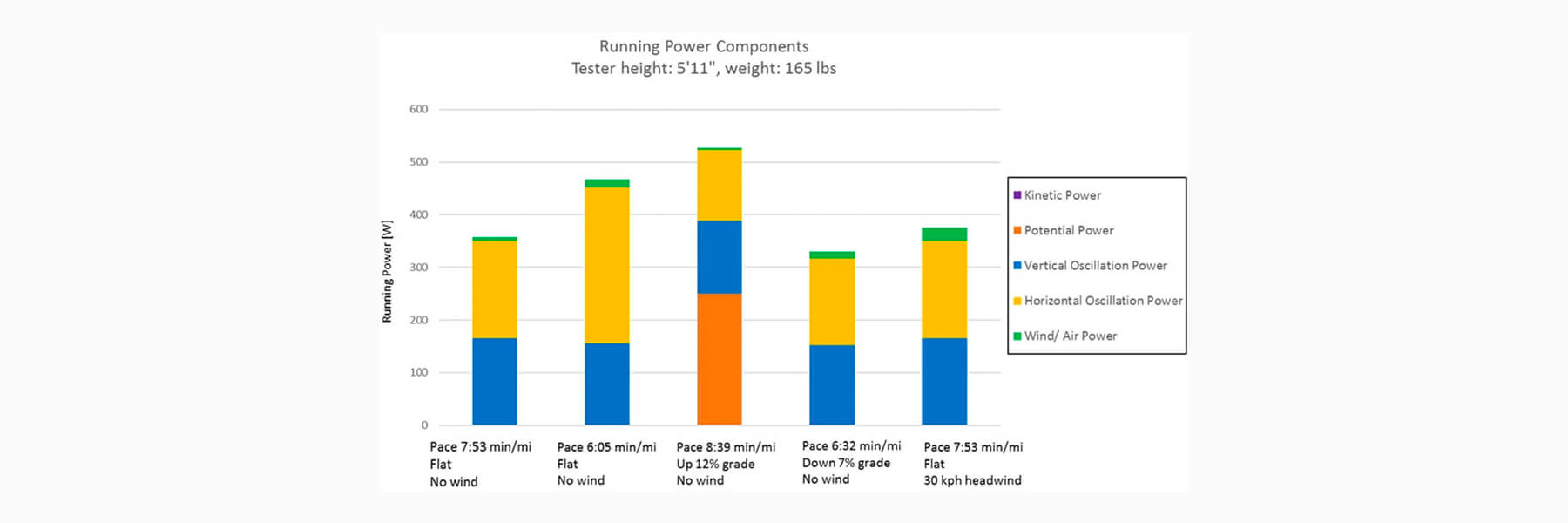
Below are examples of the effect of running power components, taken from a test subject with a cadence of 162–182, vertical oscillation of 6.2–8.9 cm and ground contact time of 262–296 ms.
What does this mean for you? While running, you'll see that running power responds quickly when you run faster or slower. You'll also notice that, compared to running on flat ground, running power is higher when running uphill at the same pace. And running power decreases when running downhill, though not by as much. This way, in addition to pace, you can use running power data to manage your effort across different terrain.
With the wind feature turned on, the Running Power app also lets you measure your effort when running on a windy day. Wind can significantly affect how hard you have to work to maintain your usual pace. If you've ever run into a strong headwind, this is no news to you. To determine the expected wind conditions, the Running Power app uses your heading from GPS and the weather service's local wind report, supplemented by your watch's barometer data. Try running back and forth along a windy stretch of road and you'll feel how much more energy you use running into the wind. If you usually run in sheltered areas or simply don't want the app to factor in wind, disable this feature in the Garmin Connect app settings.
Many runners ask how running power correlates with heart rate. The two are definitely related, because when muscles produce more power, they need more oxygen. Post-run charts show that when power rises, heart rate soon rises too. One advantage of using power data instead of heart rate to track your performance during a run is that you avoid this delay in responding to changes (e.g. pace, hills or wind). Also, unlike heart rate, running power doesn't depend on physiological factors such as your hydration level or how well rested you are.
Many runners are also surprised that their running power is much higher than their cycling power. In fact, it's expected that running power is higher than cycling power, because metabolism is much more efficient when running (about 40–45%) than when cycling (about 20–25%). This means athletes can convert the same amount of oxygen into more power when running than when cycling. Or, in terms of heart rate, more power is produced at the same heart rate. This is mainly because when running we take advantage of the passive recoil of elastic body parts (e.g. tendons). Put simply – energy is stored on landing and returned on push-off. Cycling doesn't work this way. For more information, see our FAQ.
To make training with running power easier, you can download apps that show current power, lap power, last lap power, average power or all four at once. Some runners also use zones or alerts to track their running power. To keep your running power within the desired range, you can set up five custom running power zones and/or high and low running power alerts in the app settings.
If you already have suitable Garmin devices, you can add power to your runs for free. All you need is a compatible Garmin watch and one of these four accessories: HRM-Pro, HRM-Run, HRM-Tri or the Running Dynamics Pod. Download the Running Power app now and get access to real-time power data.