



My watch's heart rate sensor is not reading my heart rate correctly
Optical heart rate sensors work using a light that measures small changes in blood flow directly at the wrist. The sensor measures changes in the capillaries beneath the outer layer of skin. Although Garmin's heart rate technology is very advanced, it still has limitations that may cause inaccurate heart rate readings in certain situations.
In this article we describe what can cause inaccurate heart rate readings and how you can potentially get more accurate readings.
Incorrect heart rate reading
Changes in blood volume in the blood vessels are not always caused by a change in heart rate.
Your vascular system is like a balloon, so body movement or tensing large muscle groups can affect the amount of blood in the wrist area. This makes accurate heart rate reading more difficult, especially when the watch is also picking up other signals that are stronger and change more dynamically.
In the following example, the watch detected and locked onto the runner's heart rate, but after 20 minutes it locked onto the running cadence instead:
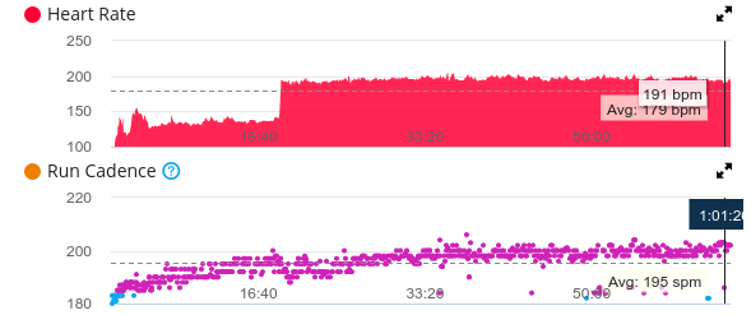
Why does this happen?
In some cases, there is not enough blood in the wrist tissue. This problem is common in cold weather or at the start of a workout, before the heart starts pumping blood faster.
How can I prevent this from happening?
If you plan to train, warm up a little first. Also make sure you are wearing the watch correctly. You will find tips on wearing the watch in the next section
Wearing the watch incorrectly
For the best wrist-based heart rate readings, follow these tips
1) The heart rate sensor must always be against the skin
2) The watch must fit snugly around your wrist, but not too tight
2.1) If the watch is too loose, it may start sliding around on your wrist, creating a gap between the skin and the sensor
2.2) If the watch is too tight, it may restrict blood flow
3) The watch fits correctly when you can move the watch and the skin under it moves along with it
Certain sports can affect heart rate accuracy
Activities that require flexing the wrist (e.g. rowing, weightlifting or holding a tennis racket) can create a similar effect to wearing the watch too tightly and restrict blood flow. In such cases, the watch has difficulty measuring an accurate heart rate..
Heart rate accuracy while swimming
Measuring heart rate at the wrist while swimming is difficult: wide arm movements affect blood flow in the wrist, cold water reduces the amount of blood in the wrist tissue, and water can "move" the watch and create a gap between the watch and the wrist. When swimming, the same recommendations apply as for other workouts: if you plan to train, warm up a little first. Also make sure you are wearing the watch correctly.
1) The heart rate sensor must always be against the skin
2) The watch must fit snugly around your wrist, but not too tight
2.1) If the watch is too loose, it may start sliding around on your wrist, creating a gap between the skin and the sensor
2.2) If the watch is too tight, it may restrict blood flow
3) The watch fits correctly when you can move the watch and the skin under it moves along with it
Skin tone can affect heart rate readings
Skin tone can affect heart rate readings because the melanin in the skin absorbs some of the light. Garmin has designed its watches to work with every skin tone.
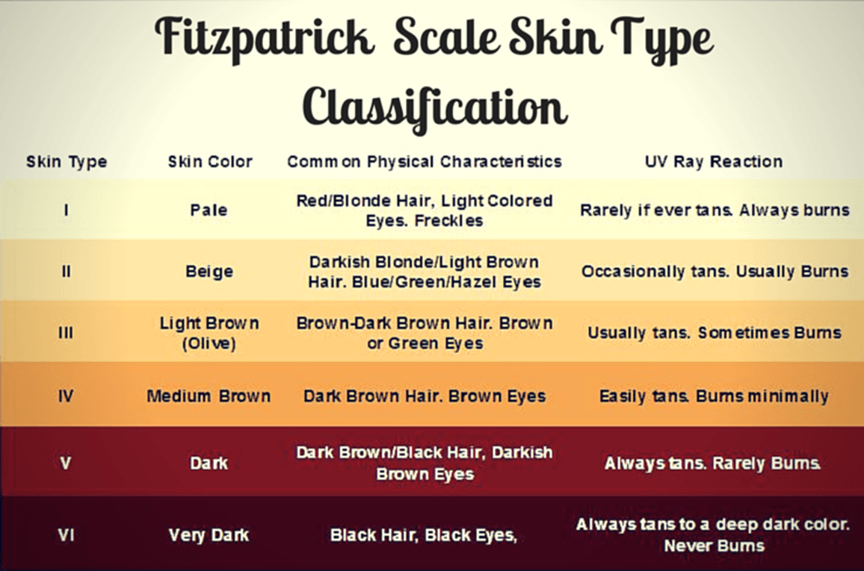
Skin with a higher Fitzpatrick classification contains more melanin. The heart rate sensor therefore has to work harder to find the heart rate and may use more battery
Tattoos can affect heart rate accuracy
Tattoos can affect the accuracy and reliability of heart rate readings. In some cases, the heart rate sensor may not work at all. Depending on the ink, pattern and amount of ink, some tattoos may
block the sensor's light, making it very difficult to get an accurate heart rate reading. Garmin recommends wearing the watch where there are no tattoos.
